Custom Funds: Build Your Own Halal Fund From Stocks You Pick
A while back we wrote about how to make your own fund. The honest answer at the time was a spreadsheet, a screening app, and a lot of patience. That post ended with Amal's fund filter, which takes an existing ETF and strips out the non-compliant holdings.
Custom funds are the next step. You pick the stocks yourself, set the weights, and Amal treats the result like any other fund: screened on every save, invested on a schedule, rebalanced, charted against the market, and shareable with a link.
Key Takeaways
- Build a fund from any stocks you like, from scratch or starting from an existing fund
- Every save is checked against compliance ratings and your personal blacklist
- Recurring buys, dividend reinvestment, rebalancing and benchmark charts all work the same as catalog funds
- Every custom fund gets a public page anyone can copy into their own account
- Building and sharing are free on every plan. Investing real money needs Pro
Why build your own fund
Amal's catalog is built around popular funds with the haram holdings removed. That covers most people, and it's still the fastest way to get a diversified halal portfolio.
But a filtered fund is still someone else's fund. There are a few situations where you want your own basket:
- You have a thesis. Ten semiconductor names, or five dividend payers you have followed for years
- You want a tighter ethical screen than any fund offers, say a boycott list applied to a handful of companies you actually trust
- The fund you want doesn't exist in a halal version, so you'd rather assemble it from the compliant pieces yourself
Until now the only way to do that on Amal was to buy the stocks individually and keep the weights balanced by hand. A custom fund does the balancing for you.
How it works
Open Create fund in the app and choose the custom builder. There are four steps.
- Name it. The name and description also show up on your shared link
- Add holdings. Search by ticker or company name. Each one shows its compliance rating as you add it
- Set target weights. Type exact percentages, or use the shortcuts to set equal weights or scale whatever you typed to 100%. Amal saves the numbers you enter and never rescales them behind your back
- Review and save
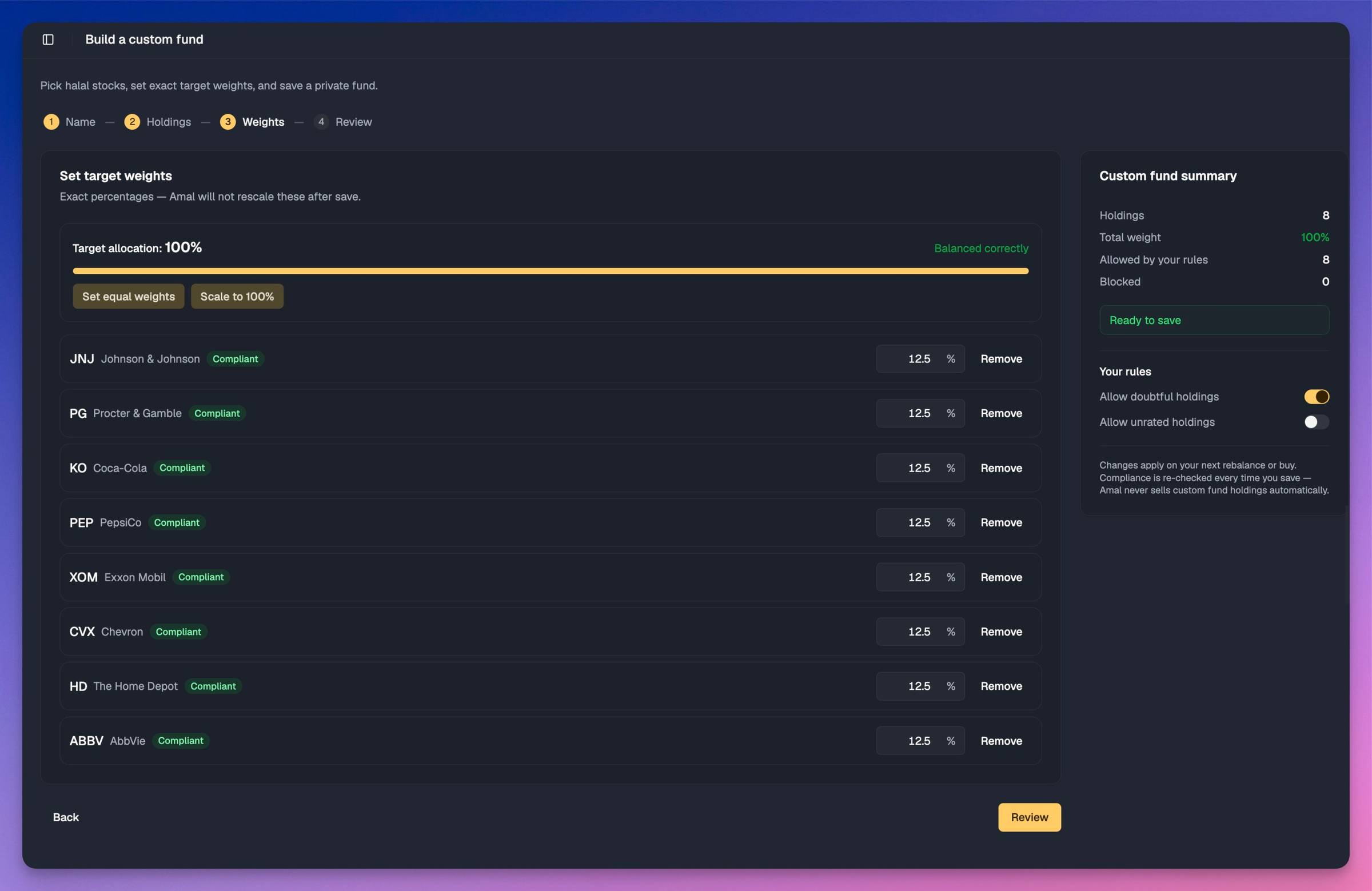
You can also start from an existing fund. Pick an ETF or mutual fund from the catalog and its top 50 holdings come in, weighted like the original. Anything that fails your rules shows as blocked, and you remove it (or allow it) before you can save.
Compliance is checked on every save
The summary panel next to the builder shows how many holdings are allowed by your rules and how many are blocked. Two toggles control the edge cases:
- Allow doubtful holdings. Companies rated "questionable" by our screening partner
- Allow unrated holdings. Companies that haven't been rated at all
Doubtful is allowed by default and unrated is not. Your personal blacklist applies too, so a company you have excluded across your account is blocked here as well. A fund with a blocked holding can't be saved, so you can't accidentally build one that breaks your own rules.
The ratings come from the same screening methodology behind every Amal fund, certified by Amanah Advisors and re-audited yearly.
What happens if a stock goes non-compliant later?
Catalog funds sell the holding automatically. Custom funds don't. It's your fund, so we notify you and leave the decision to you. Compliance is re-checked every time you save, and rebalancing or editing the fund shows you the change before anything trades.
It behaves like any other Amal fund
Once saved, a custom fund shows up alongside your other funds and gets the same machinery:
- Recurring investing, daily through monthly, including the biweekly option
- Dividend reinvestment
- Rebalancing back to your targets. If you edit the holdings, Amal prompts you to rebalance so your positions catch up
- Charts you can compare against SPY, QQQ, VTI, any catalog fund, or your Profit line
- A Closed positions section with realized gains, which matters when Zakat season comes around
Share it with a link
Every custom fund has a public page: performance against a benchmark, allocation and sector breakdowns, and a compliance badge on every holding. Returns are anchored to the date the fund was created, not a backtest window you picked after the fact.
Anyone with the link can copy the fund into their own Amal account in one click. Their copy applies their own blacklist and compliance settings before it saves, so your fund never overrides someone else's rules.
Copies stay linked to the original. When you edit your holdings, every copy picks up the change, and the share page shows how many people and copies a fund has. Someone who wants to run the same fund with two pots of money can hold up to ten linked copies.
What it costs
Building, screening, editing and sharing are free on every plan, including a free account with no broker connected. Investing real money into a custom fund is a Pro feature.
Pro is a one-time payment for lifetime access. There is no subscription. It unlocks investing in custom funds, the full library of over 10,000 ETFs and mutual funds to filter, and priority support. Standard covers the guided Grow and Save portfolios if you would rather not pick stocks at all.
Selling and rebalancing are never gated. If your plan changes, you can always get your money out or bring your weights back in line.
- Check your email inbox
- Click "Confirm Subscription" in the email we just sent
Invest halal, on autopilot
Shariah-certified portfolios, screened continuously. Non-compliant stocks removed automatically.
- Check your email inbox
- Click "Confirm Subscription" in the email we just sent

- Previous
- Compare Your Options